TFT Unlock Tool v6.3.1.1 Download Free Latest Version [2026]
Android phones can develop software problems such as FRP locks, boot loops, failed updates, and device detection errors. TFT Unlock Tool is a Windows-based Android servicing utility that offers selected repair and maintenance functions for compatible devices. Depending on the installed version, its available features may include FRP-related servicing, factory reset, firmware operations, device information, and chipset-specific functions for MediaTek (MTK) and Qualcomm platforms. Before downloading or using TFT Unlock Tool, check the version, device compatibility, and source of the installation file.
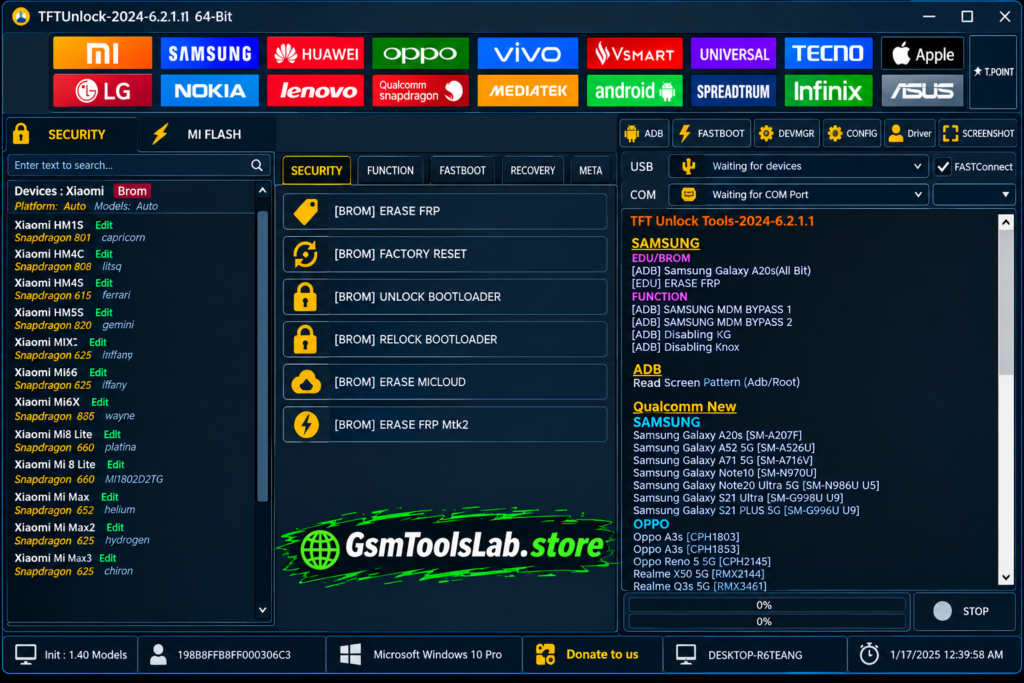
What Is TFT Unlock Tool?
TFT Unlock Tool is a Windows-based mobile servicing utility designed for selected Android phones. It provides a collection of functions that technicians may use for software maintenance, device troubleshooting, and supported repair operations. Depending on the version and phone model, available functions may include Factory Reset Protection (FRP) servicing, screen-lock-related operations, firmware flashing, device information, and chipset-specific workflows.
The tool is associated with Android brands such as Samsung, Xiaomi, Redmi, POCO, OPPO, Vivo, Realme, Infinix, and Tecno in third-party support listings. However, brand names alone do not guarantee compatibility with every model. Support can depend on the chipset, Android version, security patch, firmware, USB drivers, and connection mode.
Key Features of TFT Unlock Tool
Multi-Brand Android Support
TFT Unlock Tool is listed by third-party sources as supporting servicing functions for selected phones from Samsung, Xiaomi, Redmi, POCO, Vivo, OPPO, Realme, Huawei, Honor, Motorola, Nokia, OnePlus, Infinix, Tecno, and other brands. The available operations vary by model and software version, so check the supported-device list before starting a repair.
FRP Servicing for Supported Devices
Factory Reset Protection (FRP) is an Android security feature that can request verification of a previously synced Google Account after a factory reset. Some TFT Unlock Tool versions advertise FRP-related servicing for compatible devices. Available methods depend on the phone model, Android version, security patch, chipset, and connection mode. Use these functions only on devices you own or are authorized to service.
Screen-Lock-Related Functions
Some third-party descriptions list PIN, pattern, and password-related servicing among TFT Unlock Tool’s functions. Availability is not universal, and a particular operation may not work on newer Android versions or protected devices. Before attempting any screen-lock operation, consider the risk of data loss and confirm that you have the owner’s permission.
Firmware Flashing and Software Repair
Firmware flashing can help restore a compatible Android phone when its system software is damaged or an update has failed. TFT Unlock Tool is described as offering firmware-related operations for selected devices. The correct firmware must match the exact model and, where applicable, its regional variant. An incorrect image or interrupted flashing process can cause boot problems or make the phone unusable.
MediaTek (MTK) Support
MediaTek, commonly called MTK, is a chipset platform used in many Android smartphones. TFT Unlock Tool listings describe a dedicated MTK module for selected device-servicing workflows. Depending on the supported model and version, these may include device communication, software maintenance, and certain repair operations. MTK support does not mean every MediaTek-powered phone is compatible.
Qualcomm (QCOM) Support
Qualcomm Snapdragon processors are used in Android phones from several manufacturers. TFT Unlock Tool sources also describe Qualcomm-specific servicing functions. The available operations depend on the device, chipset, firmware, security state, and supported service mode. Confirm model compatibility before attempting any firmware or recovery procedure.
EDL Mode and Device Recovery
Emergency Download Mode (EDL) is a low-level service mode used by certain Qualcomm devices. Some third-party TFT Unlock Tool descriptions mention EDL-related workflows for supported phones. EDL availability and access requirements vary by device, and not every Qualcomm phone supports the same recovery procedure. Use the correct firmware and service instructions to reduce the risk of further damage.
ADB and Fastboot Functions
Android Debug Bridge (ADB) allows a computer to communicate with an Android device when the required settings and permissions are available. Fastboot is used for supported bootloader-level operations. Some TFT Unlock Tool listings mention ADB and Fastboot functions, but their availability depends on the installed build and connected device. USB debugging, bootloader state, drivers, and device authorization can affect communication.
Factory Reset and Device Maintenance
A factory reset restores a supported device to its default settings and usually erases personal data stored on the phone. TFT Unlock Tool versions may provide reset-related functions for selected devices. Back up important files before proceeding, and remember that resetting a phone does not necessarily remove its Google Account verification requirement or other security protections.
Device Information and Detection
Device information functions can help technicians identify a connected phone and review details made available by its current connection mode. Proper USB drivers, a reliable data cable, and a working USB port can improve detection. If TFT Unlock Tool does not recognize a device, check the selected mode and confirm that the specific phone and operation are supported.
USB Driver Support
Windows needs suitable drivers to communicate with many Android devices in different modes. TFT-related download pages mention USB driver installation and driver-management options. Correct drivers can help with device detection and stable communication, but they cannot make an unsupported model compatible. Download drivers from a trustworthy source and avoid installing unknown driver packages.
Updates and Compatibility Improvements
Third-party descriptions of newer TFT Unlock Tool packages mention additional device support, bug fixes, and changes to MediaTek and Qualcomm workflows. However, a complete, independently verified release history for the advertised versions is not available. Check the release information for the exact package you intend to use rather than assuming every listed improvement is included.
System Requirements
| Requirement | Suggested Specification |
|---|---|
| Operating System | Windows 7, 8, 10, or 11; compatibility may vary |
| Processor | Intel or AMD processor |
| RAM | 4 GB or more |
| Free Storage | At least 1 GB, plus space for the downloaded archive and extracted files |
| USB Connection | Working USB port and compatible data cable |
| Drivers | Suitable USB drivers for the connected device |
| Internet | May be required for selected functions or online services |
Download Information
Check the package details carefully before downloading TFT Unlock Tool. Third-party pages list different versions, file details, and archive passwords, so these details should not be treated as independently verified.
| Download Detail | Information |
|---|---|
| Tool Name | TFT Unlock Tool |
| Version Mentioned | v6.3.1.1 on some third-party pages |
| Latest-Version Status | Not independently verified |
| File Size | Approximately 302 MB, as reported by third-party listings |
| File Type | Compressed archive, according to some listings |
| Platform | Windows PC |
| Device Support | Selected Android devices; compatibility varies |
| Archive Password | Conflicting reports; check the exact download page |
| Download Source | Verify the publisher and file before opening |
How to Download and Install TFT Unlock Tool
- Check the download source. Visit the TFT Tool website or another source you can independently verify. Confirm that the page refers to TFT Unlock Tool.
- Review the package details. Check the version number, file size, publication information, and supported devices. Different websites may distribute different builds.
- Download the archive. Save the file to a known folder on your Windows PC. Avoid installers that require unrelated software or unexpected permissions.
- Scan the downloaded file. Use your security software before extracting or running the archive. If the file is flagged, do not simply disable protection; investigate the detection and source first.
- Extract the archive. If the package is a ZIP or RAR file, use a trusted extraction utility. If a password is requested, use only the password stated on the exact page where that package was obtained. Passwords reported by other sites may not match.
- Review the setup files. Open the extracted folder and check the filenames before launching anything. Do not run unknown scripts or additional installers that are not clearly related to the tool.
- Install suitable USB drivers. Use compatible drivers from a trustworthy source when required for your phone. Follow the instructions for your device and Windows version.
- Launch the application carefully. If the file and source have been checked and you choose to proceed, open the application according to its installation instructions. Connect only a device you own or are authorized to repair.
- Confirm compatibility before servicing. Select only an operation documented for your exact model and software version. Back up important data first because reset, flashing, and some repair operations can erase data or affect the device’s ability to boot.
Pros and Cons
| Pros | Cons |
|---|---|
| Offers multiple servicing functions in one Windows interface | Current release details are not independently verified |
| Third-party listings describe MediaTek and Qualcomm workflows | Support varies by model, chipset, and security patch |
| May provide selected FRP and reset functions | Some operations can erase data or affect device startup |
| USB drivers can help Windows communicate with supported phones | Incorrect or missing drivers may cause detection errors |
| May be useful for mobile repair learning and troubleshooting | The authenticity and safety of a particular installer must be checked |
| Can reduce the need to switch between interfaces for supported tasks | Some functions may be limited, unavailable, or require additional access |
Also Read: Fastboot Flash Tool V1.0.1.2 Download Free Latest Version [2026]
Conclusion
TFT Unlock Tool is a Windows-based Android servicing utility described by third-party sources as offering selected FRP, reset, firmware, device-information, and chipset-related functions. Its actual capabilities depend on the installed build and the phone being serviced. Before downloading, verify the package source and version, check device compatibility, scan the files, and back up important data. Use the tool only on devices you own or have permission to repair.
FAQ’s
What Is TFT Tool Used For?
TFT Unlock Tool is used for selected Android servicing tasks. Depending on the build and device, these may include FRP-related operations, factory reset, firmware servicing, device detection, and chipset-specific functions.
Is TFT Unlock Available for Windows?
Third-party listings describe TFT Unlock Tool as a Windows-based application. Check the requirements for the exact package, as compatibility with different Windows versions may vary.
Which Brands Does TFT Unlock Tool Support?
Third-party pages list brands such as Samsung, Xiaomi, Redmi, POCO, Vivo, OPPO, Realme, Huawei, Infinix, and Tecno. Support depends on the exact model, software version, and available servicing method.
Does TFT Unlock Tool Support MediaTek and Qualcomm Devices?
Third-party descriptions mention both MediaTek (MTK) and Qualcomm (QCOM) servicing modules. The available functions are model-specific, so confirm compatibility before attempting any operation.
Can TFT Unlock Tool Remove FRP?
Some versions advertise FRP-related functions for supported devices. Results depend on the model, Android version, security patch, and connection mode. Only service devices you own or are authorized to repair.
Does TFT Unlock Tool Support Firmware Flashing?
Some third-party listings describe firmware-related functions for selected devices. Always use firmware that matches the exact model and follow reliable instructions to reduce the risk of data loss or boot failure.
Why Is TFT Unlock Tool Not Detecting My Phone?
Check the USB cable, port, required drivers, and device connection mode. Restart the application if needed, then confirm that the installed version supports your model and the operation you want to perform.
Is TFT Tool Safe to Install?
The safety of a particular package cannot be guaranteed from a download-page claim alone. Verify the source, scan the archive, avoid unknown modified builds, and do not permanently disable Windows security to run an unverified installer.
Is Unlock Tool Completely Free?
Availability and access may differ between builds and functions. Check the terms and details for the specific package instead of assuming that every feature is free or unrestricted.
What Is the Latest Version of TFT Unlock Tool?
Some third-party pages list v6.3.1.1, while other pages list different versions. A current release could not be independently verified, so confirm the version details before publishing or installing a package.