SamFw FRP Tool v6.0.1 Download Free Latest Version [2026]
After a factory reset, Google Account verification and FRP can prevent a supported Samsung Galaxy device from completing setup. SamFw FRP Tool v6.0.1 is a Windows-based Android servicing utility that provides tools for FRP, ADB, MTP, CSC, firmware flashing, factory reset, and device information. It also includes selected MediaTek, Qualcomm, Xiaomi, LG, and Apple device functions. Available operations depend on the device model, chipset, Android version, firmware, and security patch.
What is SamFw FRP Tool?
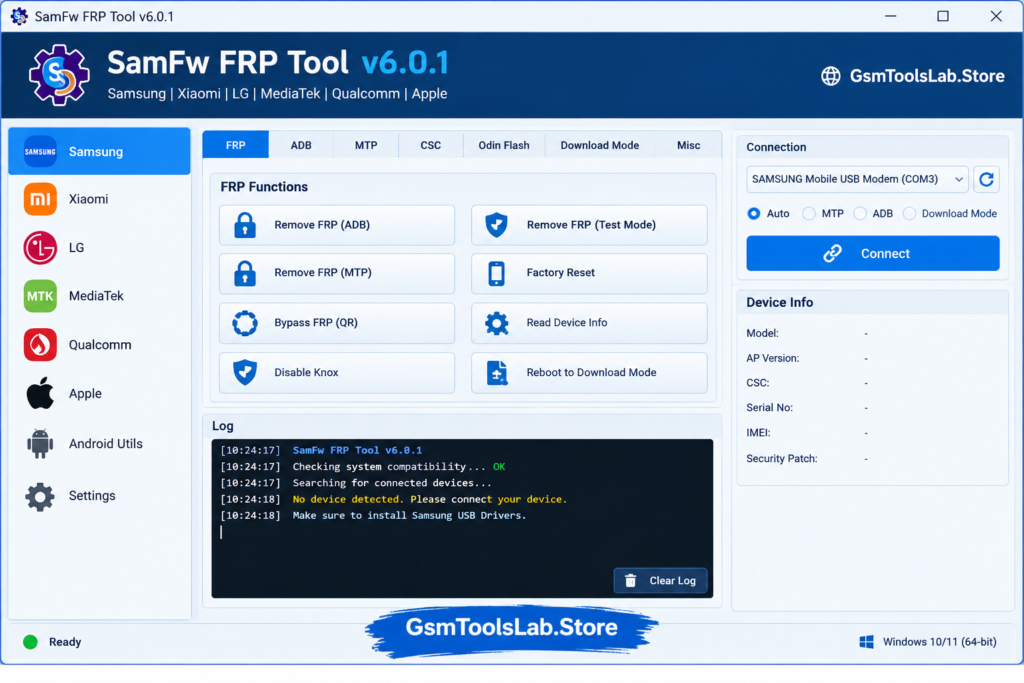
SamFw FRP Tool is a Windows-based device servicing application developed for Android and Samsung-related repair tasks. It provides functions for supported Samsung Galaxy smartphones and tablets, including FRP services, ADB operations, MTP information, CSC changes, factory reset, Download Mode tools, and Odin firmware flashing. The software also includes selected functions for Xiaomi, LG, Qualcomm, MediaTek, iPhone, and iPad devices. Because different devices use different chipsets and security levels, the available functions can vary from one model to another.
Key Features of SamFw FRP Tool 2026
FRP Support
SamFw Tool provides several Factory Reset Protection (FRP) options for supported Samsung devices. The official tool includes different FRP methods for specific Android versions, newer security levels, selected 2024 USA models, and Android 16. The available method depends on the device and its security configuration.
Exynos FRP Optimization
Version 6.0.1 includes improvements to the Samsung Exynos FRP process and fixes for related issues. Exynos-based Galaxy devices can have different security implementations, so support should always be checked against the exact model and security patch before starting a service operation.
ADB and Android Debug Bridge
ADB (Android Debug Bridge) allows a compatible Android device to communicate with a Windows computer for supported servicing functions. SamFw Tool uses ADB for tasks such as device information, CSC operations, application management, reboot functions, and other Android maintenance features.
MTP Device Information
The tool supports MTP (Media Transfer Protocol) functions for compatible Samsung devices. SamFw Tool can read information such as the device’s IMEI2 and Security Patch Level, which was added and improved in recent versions. This information can help technicians identify the software and security state before servicing.
Change CSC
SamFw Tool includes a CSC (Country Specific Code) changing function for supported Samsung devices. CSC controls regional and carrier-related software settings on Samsung firmware. The tool provides supported CSC options through available MTP, ADB, or other compatible methods depending on the device.
Samsung Firmware Flashing
The tool includes Odin Flash support for compatible Samsung firmware. It can work with common Samsung firmware components such as BL, AP, CP, and CSC, while some versions also provide automatic firmware extraction and file handling. This can be useful when repairing supported software or firmware problems.
Qualcomm EDL 9008 Support
SamFw Tool includes Qualcomm EDL 9008 functions for supported devices. The EDL partition manager provides operations such as Read, Write, and Erase, while supported devices can also have FRP reset, factory reset, or userdata functions. Version updates also add new Qualcomm firehose loaders and device support.
MediaTek Support
The software provides selected MediaTek (MTK) functions, including factory reset, format userdata, FRP-related operations, bootloader unlock or relock, and authentication bypass for supported hardware. These functions are chipset- and device-dependent and should not be treated as universal MTK support.
Xiaomi and LG Support
SamFw Tool is not limited to Samsung. Its official function list includes selected Xiaomi services such as Fastboot, Sideload, EDL 9008, FRP, MiCloud, and factory reset functions. For supported LG devices, the tool provides MTP, EDL, and LG UP/KDZ flashing functions.
Android Device Utilities
The Android section provides additional maintenance features through ADB, including battery information, factory reset, language settings, OTA update controls, network settings, and Developer Options management. It also includes an application manager for installing, disabling, enabling, clearing, or managing supported applications.
Device Information and Real-Time Logs
SamFw Tool can read available device information through supported connection modes and displays operation status while a task is running. Information such as model, serial number, IMEI2, security patch level, battery details, and connection status can help technicians identify a device before selecting a compatible service.
Apple Device Support
SamFw Tool v6.0.1 also adds basic information support for selected iPhone and iPad devices. The official changelog lists information reading in Normal, Recovery, and DFU modes, along with reboot options to Recovery and Normal Mode. This is basic Apple device support rather than a full iOS repair suite.
System Requirements
| Requirement | Details |
|---|---|
| Operating System | Windows 7, 8, 8.1, 10, or 11 |
| Processor | Intel or AMD processor |
| RAM | 2 GB or more recommended |
| Storage | At least 500 MB free space |
| USB Port | Required for device connection |
| USB Cable | Working USB data cable |
| Samsung USB Driver | Required for supported Samsung functions |
| Microsoft Visual C++ | May be required for some ADB/FRP functions |
| Internet | Required for certain online services |
| Device | Compatible Samsung, Android, Xiaomi, LG, Qualcomm, MediaTek, or supported Apple device |
SamFw FRP Tool v6.0.1 Download Information
| File Information | Details |
|---|---|
| Tool Name | SamFw Tool |
| Version | v6.0.1 |
| File Size | About 50 MB* |
| File Format | ZIP |
| Platform | Windows |
| Main Category | Android & Samsung Servicing Tool |
| Main Functions | FRP, ADB, MTP, CSC, Factory Reset, Firmware Flashing |
| Samsung Support | FRP, MTP, ADB, Download Mode, Odin |
| Qualcomm Support | EDL 9008 |
| MediaTek Support | FRP, Factory Reset, Format Userdata, Bootloader Services |
| Apple Support | Basic iPhone/iPad Information |
| Password | No password reported by official download |
| Developer | SamFw Team |
How to Download and Install SamFw FRP Tool v6.0.1?
- Download SamFw Tool v6.0.1 from the official SamFw source or another trusted source.
- Extract the downloaded ZIP file using 7-Zip, WinRAR, or Windows extraction.
- Open the extracted SamFw Tool folder.
- Install the required Samsung Android USB Driver if you are working with a Samsung device.
- Install Microsoft Visual C++ if the tool requires it for ADB or other functions.
- Launch SamFw Tool v6.0.1 on your Windows computer.
- Connect the supported device with a reliable USB data cable.
- Use the connection mode required by your particular device, such as MTP, ADB, Download Mode, Fastboot, EDL, or Sideload where supported.
- Allow USB debugging authorization when it appears on an owned or authorized device.
- Wait for SamFw Tool to detect the device and show the available functions.
- Select only an operation that is supported for your exact model, chipset, firmware, and security level.
- Keep the USB connection stable until the selected operation has finished.
The official SamFw documentation specifically recommends installing the Samsung driver when needed and provides separate requirements for supported FRP services.
Pros and Cons
| Pros | Cons |
|---|---|
| Supports many Samsung servicing functions | Not every device supports every function |
| Includes FRP options for supported models | Security patch can affect FRP compatibility |
| Supports ADB and MTP operations | Some services require specific connection modes |
| Provides CSC changing functions | Advanced functions may require technical knowledge |
| Includes Odin firmware flashing | Some online FRP services require credits |
| Supports Qualcomm EDL 9008 | EDL support is device- and security-dependent |
| Includes selected MediaTek functions | MTK operations are chipset dependent |
| Supports selected Xiaomi and LG functions | Apple support is limited to basic functions |
| Adds basic iPhone and iPad information tools | Windows is required |
Conclusion
SamFw FRP Tool v6.0.1 is a Windows-based servicing utility with a wide range of functions for supported Samsung Galaxy and Android devices. It includes FRP, ADB, MTP, CSC, firmware flashing, EDL, MediaTek, Qualcomm, and selected Apple device functions. Because support changes by model, chipset, firmware, and security patch, always verify compatibility before starting a repair operation.
Also Read: Huawei FRP Tool V1.0 Download Free Fastboot and BROM Mode [2026]
FAQ’s
Why is my phone not detected in SamFw Tool?
Check the Samsung USB drivers, USB cable, and connection mode. If the phone still does not appear, compatibility may depend on its model and Android version.
Why does SamFw FRP Tool fail on newer Samsung phones?
FRP methods can stop working on newer security patches. Users have reported different results depending on the Android version, model, and patch level.
Does SamFw Tool work with Android 13 or Android 14?
It can work on some devices, but there is no single method for every phone. The model, security patch, and available USB mode matter.
Does SamFw Tool support Apple devices?
Yes, newer versions include basic information reading for supported iPhone and iPad devices in Normal, Recovery, and DFU modes.
Can SamFw Tool change the CSC of a Samsung device?
Yes, it includes a CSC-changing option for supported Samsung devices and allows users to select the available CSC options.