Huawei FRP Tool V1.0 Download Free Fastboot and BROM Mode [2026]
Getting stuck at Google Account verification after resetting a Huawei phone can be frustrating, especially when the original account details are unavailable. Huawei FRP Tool v1.0 is a Windows-based servicing utility designed for supported Huawei devices. It provides communication through Fastboot Mode and BROM Mode, with support for compatible MediaTek (MTK) chipsets. For proper detection, Huawei USB Drivers and a stable USB connection may be required. Compatibility depends on the Huawei model, chipset, firmware, Android version, and security level.
What is the Huawei FRP Tool?
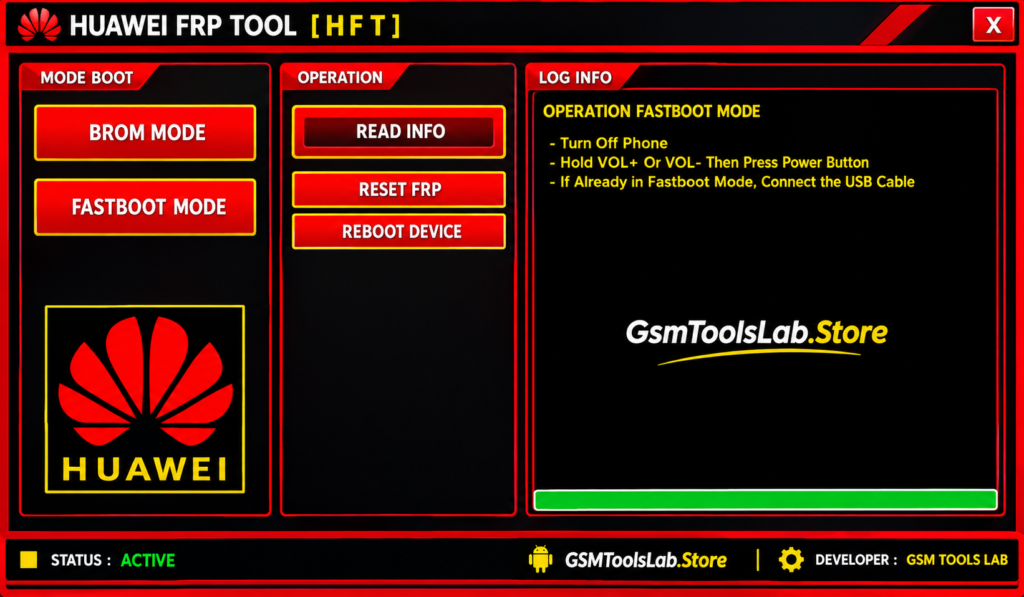
Huawei FRP Tool is a Windows utility used for servicing supported Huawei smartphones and handling certain software-related problems. It works with device communication modes such as Fastboot Mode, Boot Mode, and BROM Mode, depending on the model and chipset. The tool is mainly associated with Factory Reset Protection (FRP) and certain screen-lock servicing functions, including PIN, password, and pattern-related operations on compatible devices. Proper Huawei USB Drivers are important because the computer needs to communicate correctly with the connected Huawei phone.
Key Features of Huawei FRP Tool 2026
FRP Repair
Huawei FRP Tool v1.0 provides FRP-related servicing functions for supported Huawei devices. Factory Reset Protection can appear after a reset when the phone asks for the previously synced Google Account. Available servicing options depend on the particular device and software version.
Fastboot Mode
The tool supports Fastboot Mode for compatible Huawei devices. Fastboot provides a communication channel between the phone and Windows computer and can be used by supported servicing tools for specific device operations.
BROM Mode
BROM Mode is another communication method supported by Huawei FRP Tool on compatible hardware. It is particularly relevant when working with supported MediaTek (MTK) devices, although the available operations depend on the chipset and device implementation.
Boot Mode Support
Huawei devices can use different startup and communication modes during servicing. Huawei FRP Tool includes support for relevant Boot Mode operations where supported, helping technicians establish communication before performing an available repair function.
MediaTek (MTK) Support
The tool can communicate with compatible Huawei devices using MediaTek chipsets. MTK support is important for BROM-based servicing, but it should not be treated as universal support for every Huawei phone because chipset and firmware compatibility can differ between models.
Multiple Huawei Device Compatibility
Huawei has released devices with different chipsets, Android versions, EMUI releases, and security levels. Huawei FRP Tool is intended for supported models, but compatibility should always be checked before starting a repair operation.
Simple Dashboard
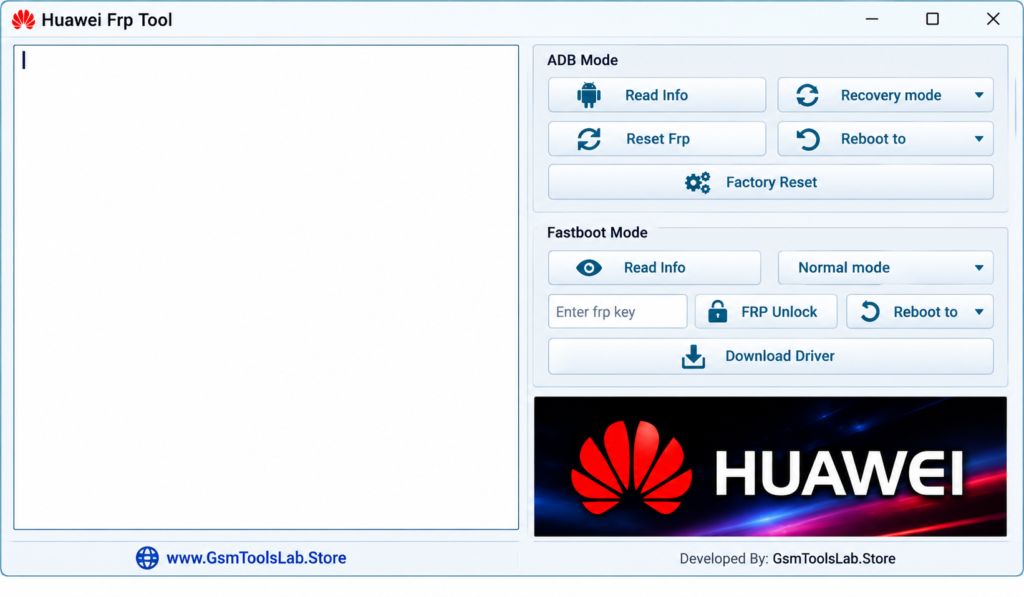
The tool uses a straightforward Windows interface where the available servicing functions can be accessed without unnecessary complexity. This can make the utility easier to understand for mobile technicians who regularly work with Huawei devices.
Lightweight Utility
Huawei FRP Tool v1.0 is distributed as a relatively small utility, so it does not require a large amount of storage. A lightweight design can be useful when working on older Windows computers used for mobile servicing.
Screen Lock Support
On compatible Huawei devices, the tool may provide servicing options related to PIN, password, or pattern locks. These functions are model-dependent, so users should confirm compatibility before attempting any screen-lock operation.
System Requirements
| Requirement | Details |
|---|---|
| Operating System | Windows 7, Windows 8.1, Windows 10, Windows 11 |
| Architecture | 32-bit / 64-bit |
| Processor | Intel or AMD |
| RAM | 1 GB or more |
| Storage | At least 500 MB free space |
| USB Port | Required |
| USB Drivers | Huawei USB Drivers recommended/required for detection |
| Device Connection | Compatible Huawei smartphone/tablet and USB cable |
Huawei FRP Tool v1.0 Download Information
| File Information | Details |
|---|---|
| Tool Name | Huawei FRP Tool |
| Version | V1.0 |
| File Size | 57.91 MB |
| File Format | ZIP |
| Platform | Windows |
| Architecture | 32-bit / 64-bit |
| Main Modes | Fastboot Mode, BROM Mode, Boot Mode |
| Chipset Support | Compatible MediaTek (MTK) Devices |
| USB Requirement | Huawei USB Drivers |
| Password | None reported |
How to Download and Install Huawei FRP Tool v1.0?
- Download Huawei FRP Tool v1.0 from a trusted source.
- Make sure the required Huawei USB Drivers are installed on your Windows computer.
- If required for your device, install Huawei HiSuite and its supporting drivers.
- Extract the downloaded ZIP file using Windows or another archive utility.
- Open the extracted Huawei FRP Tool folder.
- Run the available executable file according to your Windows setup.
- Connect the supported Huawei device with a good-quality USB data cable.
- Enter the communication mode required by your specific device, such as Fastboot or BROM Mode.
- Wait for the tool to detect the phone.
- Use only the servicing function supported by your exact Huawei model and software version.
Pros and Cons of Huawei FRP Tool
| Pros | Cons |
|---|---|
| Simple Windows interface | Not compatible with every Huawei model |
| Supports Fastboot Mode | Compatibility depends on device configuration |
| Supports BROM Mode | MediaTek support is model-dependent |
| Compatible with supported MTK Huawei devices | Huawei USB Drivers may be required |
| Useful for supported FRP servicing | Newer security patches may affect compatibility |
| Lightweight utility | Some operations require technical knowledge |
| Supports certain screen-lock servicing functions | Firmware and chipset differences can affect results |
Also read:iTools v4.5.1.9 Download Free Latest Version [2026]
Conclusion
Huawei FRP Tool v1.0 is a Windows utility for servicing supported Huawei devices with FRP and certain screen-lock issues. It provides Fastboot, BROM, and relevant device communication options, including support for compatible MediaTek hardware. Before using the tool, check the exact Huawei model, chipset, firmware, Android or EMUI version, security level, and required USB drivers to avoid compatibility problems.
Frequently Asked Questions
What is Huawei FRP Tool?
Huawei FRP Tool is a Windows-based servicing utility for supported Huawei devices. It is mainly associated with FRP-related and certain software or screen-lock servicing tasks.
Which modes does Huawei FRP Tool support?
The tool is associated with Fastboot Mode, BROM Mode, and Boot Mode. The available mode depends on the Huawei model, chipset, and supported servicing operation.
Does Huawei FRP Tool support MediaTek devices?
Yes, it supports compatible MediaTek (MTK) Huawei devices. BROM communication is particularly relevant to MTK hardware, but support varies by model and firmware.
Do I need Huawei USB Drivers?
Yes. Proper USB drivers are important for stable communication between the Huawei device and Windows computer. Huawei also provides official HiSuite software and connection instructions for supported devices.
Can Huawei FRP Tool work on every Huawei phone?
No. Compatibility is not universal. It can vary according to the device model, chipset, firmware, Android or EMUI version, and security patch level.
Can Huawei FRP Tool remove a forgotten Google Account?
FRP is a Google security feature designed to protect a reset device. For an FRP-locked phone, the normal ownership-verification method is to sign in with the previously synced Google Account. Tool support, where available, depends on the exact device and software configuration.
Can I use Huawei FRP Tool on HarmonyOS devices?
Support should not be assumed for every HarmonyOS device. Huawei devices differ by model, chipset, operating system, and security implementation, so compatibility should be verified before using a third-party servicing utility.
What should I check before using Huawei FRP Tool?
Check the Huawei model, chipset, firmware, Android/EMUI or HarmonyOS version, security patch, USB drivers, and supported communication mode first. This helps prevent using an incompatible operation on the device.