KG Killer Tool v3.8.0 Latest Version Free Download [2027]
Facing Samsung KG, MDM, FRP, or other Android servicing problems? KG Killer Tool v3.8.0 brings different servicing options together in one Windows utility. It supports Samsung, Qualcomm, Xiaomi, Vivo, ASUS, Huawei, and Honor devices. Its features include ADB, Fastboot, DIAG Mode, Qualcomm EDL, and APK management. The latest release also adds 40 Qualcomm devices for expanded device compatibility.
What is KG Killer Tool?
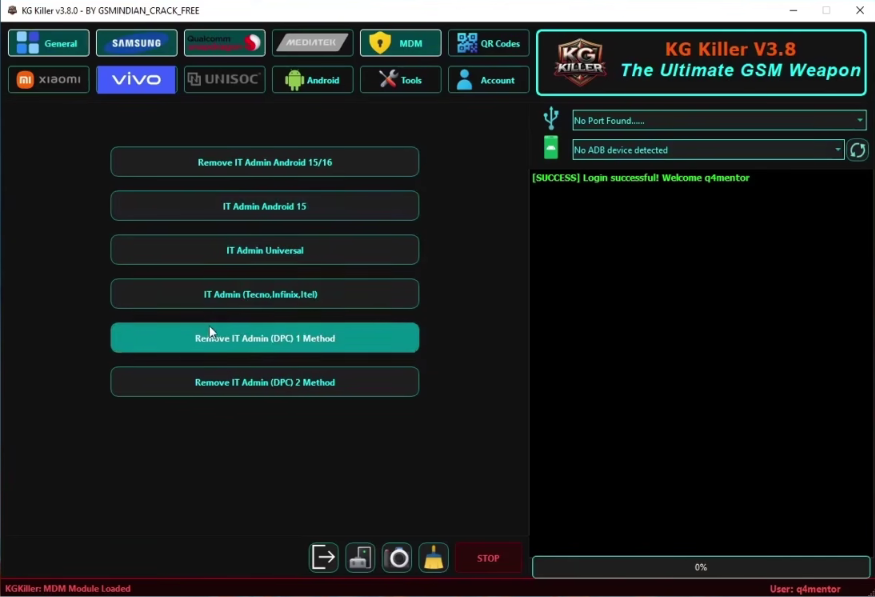
KG Killer Tool is a Windows utility developed for Android device servicing and maintenance. It offers dedicated modules for Samsung, Qualcomm, Xiaomi, Vivo, ASUS, Huawei, and Honor devices. Version 3.8.0 expands Qualcomm support by adding 40 devices, including 28 ASUS and 12 Huawei/Honor models. The software also provides FRP reset, factory reset, ADB, MDM, IT Admin, QR Code, Fastboot, and application management functions.
Key Features of KG Killer Tool 2027
Enable DIAG Mode
KG Killer Tool allows technicians to enable DIAG Mode on compatible Android phones. This helps establish a diagnostic connection for device testing, Qualcomm servicing, and other supported repair operations.
Bootloader Unlock
The bootloader unlock function allows users to unlock supported Android devices for installing custom ROMs, custom recoveries, and rooting. Always create a backup before making bootloader changes to protect important phone data.
FRP Bypass
KG Killer Tool includes FRP bypass functions for supported Android devices. It helps with Google account verification issues that may appear after a factory reset when the original account credentials are unavailable.
ADB and Fastboot
The tool provides ADB and Fastboot connectivity for supported Android devices. These connection modes help technicians communicate with phones and perform different device servicing and maintenance operations.
Read Device
The Read Device function retrieves connected phone information through ADB and Samsung MTP. Technicians can use these details to identify the device and select suitable servicing operations.
KG (EDL) Protection and MDM
KG Killer Tool provides several KG and EDL-related functions, including KG Unload, Kill KG, IT Admin, Serial Number change, and MDM download fixes for supported Android devices.
ADB Enable & HyperOS QR Code
KG Killer Tool offers different QR Code methods to enable ADB on compatible Android devices. Available options include Android 14 Method 1, Android 14 Method 2, and Android 13. It also provides HyperOS QR Code Methods 1 and 2 for supported Xiaomi devices.
Android APK Management Features
The Android APK Management module helps users manage applications on connected devices. It allows technicians to save APK files, install applications, enable or disable system apps, and uninstall unwanted APKs.
Download Information
| Detail | Info |
|---|---|
| Tool Name | KG Killer Tool |
| Version | v3.8.0 |
| Platform | Windows |
| License | Free Download (account/login may be required) |
System Requirements
| Component | System Requirements |
|---|---|
| Operating System | Windows 10 / 11 (64-bit) |
| Processor | Intel or AMD processor |
| RAM | 4 GB or higher recommended |
| Architecture | 64-bit |
| Microsoft Runtime | Visual C++ x86/x64 |
| USB Drivers | Samsung, Qualcomm 9008, MediaTek |
| Internet | Required for account login and online authentication |
| USB Connection | USB cable and compatible device drivers |
What’s New in KG Killer Tool v3.8.0?
- 40 Additional Qualcomm Devices: The latest release expands the supported Qualcomm device list with 40 new models.
- 28 ASUS Models: Adds support for 28 ASUS devices, including models from the ROG Phone and Zenfone series.
- 12 Huawei/Honor Models: Expands compatibility with 12 additional Huawei and Honor devices.
- Bug Fixes: Includes minor bug fixes and stability improvements for smoother software operation.
How to Download KG Killer Tool v3.8.0
Follow these steps to download and run KG Killer Tool on your Windows computer:
- Visit the official KG Killer Tool website or open the provided download link.
- Go to the Download section to find the available release.
- Select KG Killer Tool v3.8.0 and click its download link.
- Allow the setup package to download completely.
- Find the downloaded RAR file on your computer.
- Extract the package with WinRAR or 7-Zip.
- Enter the extraction password if the archive asks for one.
- Open the extracted folder and find the KG Killer Tool EXE file.
- Right-click the executable and choose Run as Administrator.
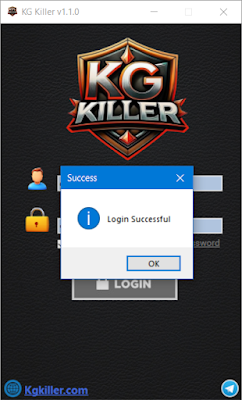
- Enter your authorized account details to log in.
- Once the software opens, select the module required for your device.
Pros and Cons
| Pros | Cons |
|---|---|
| Works with several Android brands, including Samsung, Xiaomi, Vivo, ASUS, and Huawei. | Not every function is available for all device models. |
| Provides Samsung KG, MDM, FRP, and IT Admin options. | Online authentication may be needed for certain operations. |
| Adds 40 Qualcomm devices in the v3.8.0 release. | Some advanced functions require technical experience. |
| Includes ADB, Fastboot, and DIAG Mode support. | Correct USB driver installation is necessary. |
| Provides Android 13, Android 14, and HyperOS QR Code methods. | Results may vary depending on the Android version and security patch. |
| Supports APK installation and system app management. | Application management features depend on device compatibility. |
| Includes Qualcomm 9008 EDL servicing functions. | Incorrect operations may cause data loss or device problems. |
| Offers software updates and bug fixes. | Online functions depend on server availability. |
Useful link: Huawei FRP Tools V2.0 – Free Download for Windows
Conclusion
KG Killer Tool v3.8.0 brings multiple Android servicing functions into one Windows application. It covers Samsung KG, MDM, FRP, Qualcomm EDL, Xiaomi MDM, Vivo IT Admin, ADB, Fastboot, and APK management. The latest update adds 40 Qualcomm devices, including 28 ASUS and 12 Huawei/Honor models. Its modules help technicians perform different maintenance and repair tasks on compatible Android smartphones.
FAQs
What can I do with KG Killer Tool?
KG Killer Tool provides Android servicing functions such as Samsung KG, MDM, FRP, Qualcomm EDL, ADB, Fastboot, and application management for compatible devices.
Can KG Killer Tool v3.8.0 work with Android 15 and 16?
Its listed Samsung KG and FRP modules cover supported Android versions. However, successful operations depend on the phone model and installed security patch.
Do I need a hardware box to use KG Killer Tool?
No physical servicing box or USB dongle is required according to its digital account-based setup. However, some online functions may require account authentication.
What devices were added in KG Killer Tool v3.8.0?
Version 3.8.0 adds 40 Qualcomm devices to the supported list. These include 28 ASUS models and 12 Huawei/Honor models with selected FRP reset and factory reset functions.
Why is my Samsung phone not detected by KG Killer Tool?
Check whether the Samsung USB drivers are installed correctly. Also, try another USB cable, verify the connection mode, and make sure the phone supports the selected operation.
Is an internet connection necessary for KG Killer Tool?
Yes, an internet connection is required for account login and online authentication. Some server-based servicing operations may also depend on service availability.
How can I fix KG Killer Tool errors during servicing?
First, verify device compatibility, USB drivers, and the selected connection mode. Check the operation log and server status. If the problem remains, contact the tool’s support team.