
Easy Multi Tool v1.2.0 Download the Latest Version for Windows [2027]
Android phones can develop software problems such as boot loops, failed firmware installations, Factory Reset Protection (FRP) locks, and device detection errors. Easy Multi Tool v1.2.0 brings several Android servicing functions together in a Windows-based application, helping mobile technicians manage supported devices from one interface. Its listed capabilities cover Qualcomm, MediaTek (MTK), and Unisoc (SPD) platforms, although available functions depend on the device model, security level, and connection mode.
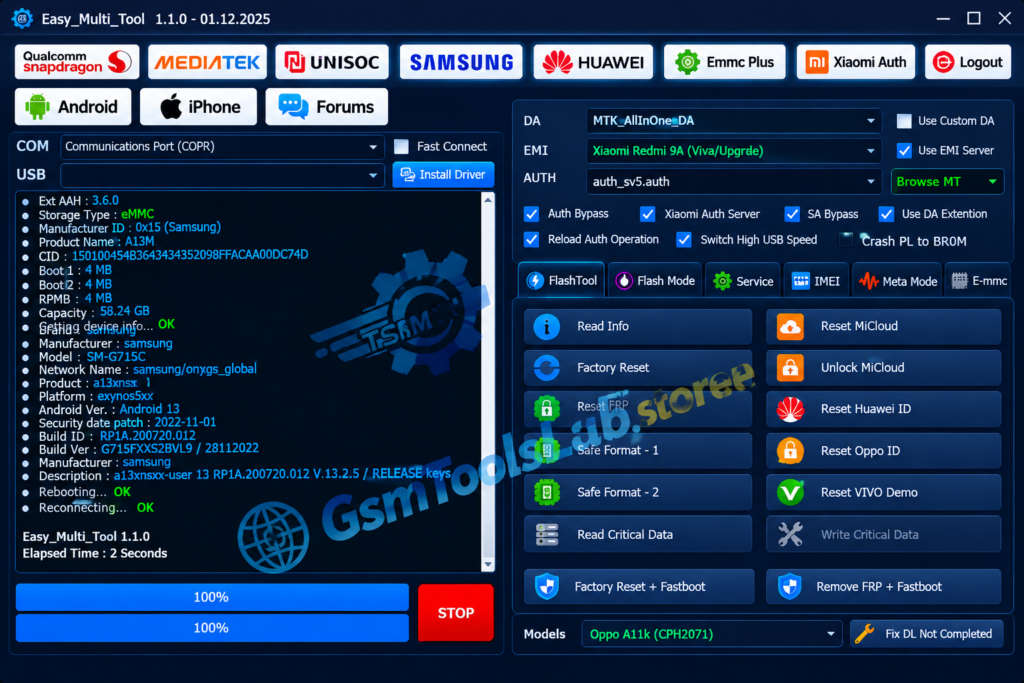
What Is Easy Multi Tool v1.2.0?
Easy Multi Tool v1.2.0 is a Windows utility designed for Android phone servicing and software maintenance. It combines multiple functions that technicians may use when diagnosing or repairing compatible smartphones. Depending on the module and device, these operations can include firmware flashing, factory reset, FRP servicing, partition management, and other maintenance tasks.
The software is associated with Qualcomm Snapdragon, MediaTek, and Unisoc platforms. Instead of switching between separate utilities for every supported task, technicians can select the relevant module and follow its available options. However, not every feature works on every phone, and some operations may require authorization, specific drivers, or an active service license.
Key Features of Easy Multi Tool
MediaTek (MTK) Module
The MTK module provides servicing options for compatible MediaTek-powered Android devices. Depending on the supported model, these may include firmware operations, factory reset, FRP servicing, Meta Mode functions, and partition-related maintenance. Some advanced features may also require suitable Download Agent (DA) files or a supported connection mode.
Factory Reset
The factory reset function helps technicians restore supported devices by clearing user data. Available reset methods can differ according to the chipset, device configuration, and security restrictions. Always confirm that the device owner has authorized the operation and back up important data before proceeding, because a reset can permanently erase personal files.
FRP Reset and Servicing
Factory Reset Protection (FRP) is an Android security feature that can require verification of a previously linked Google account after a reset. Easy Multi Tool lists FRP-related servicing functions for supported devices. Availability depends on the model, Android version, security patch, and supported service method; it should not be assumed to work universally.
Firmware Flashing
Firmware flashing can help reinstall or repair the operating system when a compatible device has software errors, failed updates, or certain boot problems. Before flashing, technicians should identify the exact model and select firmware that matches its hardware and software requirements. An incorrect firmware package or interrupted process can cause serious device problems.
Qualcomm Servicing and Partition Management
The Qualcomm module is intended for supported Snapdragon devices and may provide functions such as device information, firmware operations, reset services, and partition management. Depending on the model and available connection mode, partition tools may offer read, erase, or write operations. These advanced options should only be used when the correct partition and procedure are confirmed.
Unisoc (SPD) Support
The Unisoc module covers selected smartphones powered by Unisoc chipsets. Depending on the supported device, available options may include PAC firmware flashing, factory reset, FRP servicing, partition operations, and NV-related functions. Correct drivers and compatible firmware files are important for reliable device communication.
MDM and Knox Guard Services
Some Easy Multi Tool versions and supported device configurations list Mobile Device Management (MDM) and Samsung Knox Guard (KG) servicing options. These functions are not universal, and availability can depend on the device, software build, authorization, and service version. Only perform authorized servicing on devices you own or have permission to maintain.
Multi-Brand Device Support
The software is associated with servicing options for multiple Android brands, potentially including Samsung, Xiaomi, Redmi, OPPO, Realme, Vivo, Tecno, Infinix, itel, Nokia, Huawei, and other supported manufacturers. Brand names alone do not guarantee compatibility with every model. Check the specific device and function in the current support list before starting a repair.
What’s New in Easy Multi Tool?
The v1.2.0 release information and later update notes should be considered separately. The official updates page lists newer releases with changes to supported models and servicing functions, so features advertised for a newer build should not automatically be attributed to v1.2.0.
When reviewing an update, check for:
- Additional supported device models and chipset profiles.
- Changes to factory reset and FRP servicing.
- Updated firmware, DA, or preloader support where applicable.
- Improvements to device detection and USB connection handling.
- Changes to partition management and flashing functions.
- Bug fixes and general performance improvements.
System Requirements and File Information
The following table provides general preparation guidance. Exact requirements and package details should be confirmed against the specific release you download.
| File Information | Details |
|---|---|
| Tool Name | Easy Multi Tool |
| Version Covered | v1.2.0 |
| Software Type | Android servicing utility |
| Platform | Windows PC |
| Operating System | Confirm compatibility with the downloaded release |
| RAM | 4 GB minimum suggested |
| Free Storage | Keep at least 500 MB available as a general allowance |
| USB Drivers | Compatible Android and chipset drivers may be required |
| USB Connection | Working data-capable USB cable and port |
| Internet Connection | May be required for online services or activation |
| File Size | Verify the exact package size before downloading |
| Architecture | Check the release requirements for 32-bit or 64-bit support |

How to Download, Install, and Use Easy Multi Tool
Follow these general steps to prepare the software and connect a compatible Android device.
- Open the official Easy Multi Tool website and check the available release.
- Review the supported-device information and any license or account requirements.
- Download the setup package from a trusted source.
- If the download is compressed, extract it using a suitable archive utility.
- Install the required Android USB and chipset drivers for your device.
- Run the installer or application according to the publisher’s instructions.
- Launch the program and complete any required sign-in or activation steps.
- Connect the Android phone to your Windows PC using a reliable USB cable.
- Select the appropriate module, such as MTK, Qualcomm, or Unisoc, if supported.
- Choose the required servicing operation and carefully review the displayed instructions.
- Confirm device compatibility and back up important data before making changes.
- Wait for the operation to finish before disconnecting the phone or restarting it.
Pros and Cons
| Pros | Cons |
|---|---|
| Combines multiple Android servicing functions in one interface. | Device and feature compatibility varies. |
| Covers selected Qualcomm, MediaTek, and Unisoc devices. | Some operations may require an active license or online authorization. |
| Offers firmware and reset-related operations for supported models. | Incorrect firmware or partition operations can damage software installations or erase data. |
| Can reduce the need to switch between separate servicing utilities. | USB driver and connection problems can prevent device detection. |
| Includes options for technicians working with different Android brands. | Older releases may lack support for newer devices and security updates. |
| Provides a central place to access the modules available in the installed release. | Advanced functions require appropriate technical knowledge and authorization. |
Also Read: TSM Tool Pro v2.4.1 Download Free Setup [2027]
Conclusion
Easy Multi Tool v1.2.0 brings several Android servicing functions into one Windows application, with listed support for Qualcomm, MediaTek, and Unisoc platforms. It may help technicians with compatible firmware, reset, and device-maintenance tasks. Before installing this release, verify its source, system requirements, licensing conditions, and supported models. For newer device support, compare v1.2.0 with the updates available on the official website.
FAQ’s
What is Easy Multi Tool used for?
It is a Windows-based Android servicing utility that offers selected firmware, reset, FRP, and other maintenance functions for compatible devices.
Does Easy Multi Tool v1.2.0 support Qualcomm devices?
The software lists Qualcomm-related servicing functions, but the available operations depend on the exact model, chipset, connection mode, and release.
Can Easy Multi Tool flash MediaTek firmware?
The MTK module includes firmware-related functions for supported devices. Always use the correct firmware package and confirm model compatibility before flashing.
Does Easy Multi Tool support Unisoc phones?
It lists Unisoc (SPD) support for selected devices. Available functions may include PAC flashing and reset-related operations, depending on the device and software version.
Can Easy Multi Tool remove FRP?
The software lists FRP servicing functions for supported devices. Success and availability vary with the model, Android version, security patch, and supported service method.
Does Easy Multi Tool require USB drivers?
Compatible Android USB and chipset drivers may be necessary for Windows to detect the phone correctly. The required driver depends on the device and connection mode.
Is Easy Multi Tool v1.2.0 the latest version?
Not according to the official updates page, which lists releases newer than v1.2.0. Check the publisher’s website for the current release and its supported features.
Is Easy Multi Tool compatible with Windows 11?
Compatibility should be checked against the requirements for the specific release. Also confirm that its drivers and any required dependencies work with your Windows installation.

One Comment