Chigo Unlocker Tool V3.5 for Qualcomm & MediaTek 100% working
Android repair can become difficult when a phone needs firmware flashing, FRP servicing, factory reset, or chipset-specific operations. Chigo Unlocker Tool V3.5 brings EDL, Fastboot, BROM, FRP, firmware flashing, user-lock, partition, and network repair functions together for supported Qualcomm, MediaTek, and Spreadtrum/UNISOC devices.
What Is Chigo Unlocker Tool V3.5?
Chigo Unlocker Tool V3.5 is a Windows-based Android servicing utility designed for mobile technicians working with supported Qualcomm, MediaTek, and Spreadtrum/UNISOC devices. Depending on the phone model, the tool provides functions for FRP servicing, factory reset, firmware flashing, Fastboot, Qualcomm EDL, MediaTek BROM, partition management, user-lock removal, and network-related operations. It supports selected devices from brands such as Xiaomi, OPPO, Realme, Samsung, and Vivo.
Key Features of Chigo Unlocker Tool
Qualcomm EDL Flashing
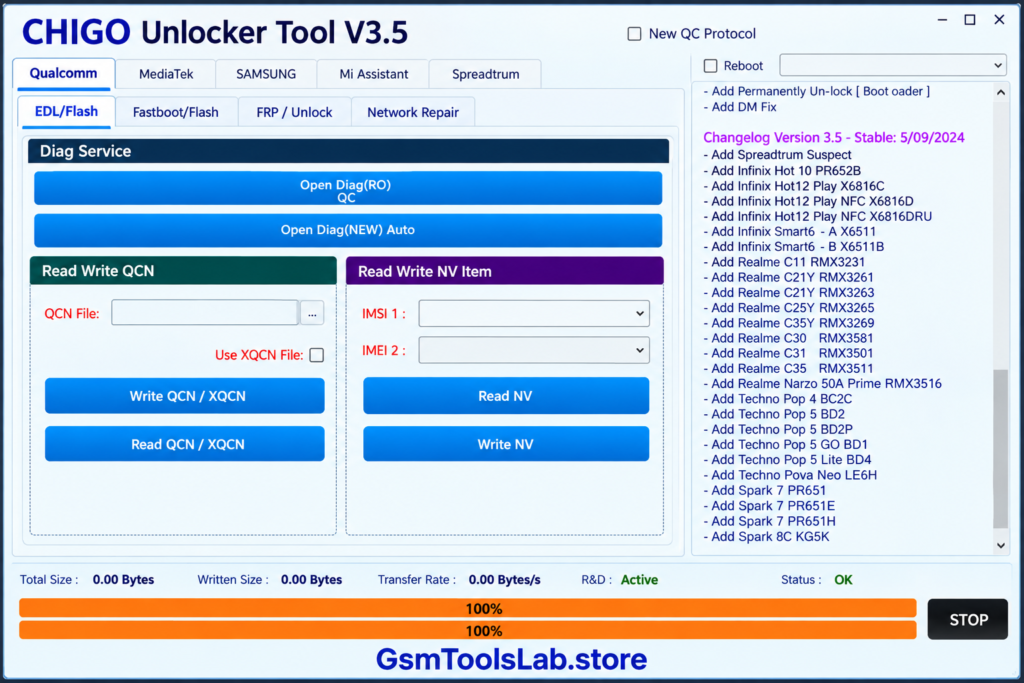
Chigo Unlocker Tool supports selected Qualcomm devices through Emergency Download Mode (EDL). Depending on the supported model and programmer, technicians can use functions such as firmware flashing, FRP-related servicing, userdata cleaning, GPT reading, erase operations, and supported backup functions.
Fastboot Flashing
The Fastboot section provides firmware flashing and reboot functions for compatible Android devices. It can also provide access to supported device modes such as EDL when the connected phone supports the required Fastboot operations.
FRP Reset
Chigo Unlocker Tool includes FRP-related servicing options for supported Android devices. Available FRP functions can vary according to the phone model, Android version, chipset, security level, and connection mode.
User Lock Removal
The tool provides user-lock servicing functions for compatible devices. Depending on the supported model and connection method, these options can assist with supported screen-lock and user-lock servicing operations.
Xiaomi EDL Unlock
For supported Xiaomi smartphones, Chigo Unlocker Tool provides EDL-based servicing options. These can include factory reset, FRP/EFS-related operations, and selected Mi Cloud servicing functions depending on the device model and software configuration.
OPPO and Realme Support
Selected OPPO and Realme devices can access servicing functions through Chigo Unlocker Tool. Available operations may include factory reset and EFS-related servicing, with support depending on the device model, chipset, firmware, and connection mode.
Samsung and Vivo Support
The tool provides selected servicing options for Samsung and Vivo smartphones. Depending on the supported model, these can include device information, FRP/EFS operations, data reset, safe formatting, and other Android servicing functions.
Network Repair
Chigo Unlocker Tool includes network-related functions for compatible Qualcomm devices. The Network Repair section can provide Diag Mode access along with QCN and NV-related read and write operations for supported models.
MediaTek Functions
The MediaTek section provides several functions for supported MTK smartphones, including firmware flashing, erase operations, backup, partition management, and Preloader-related servicing. The required connection mode depends on the device model.
Universal BROM Unlock
Universal BROM provides low-level servicing options for supported MediaTek devices. Available functions can include Auth Bypass, Bootloader Unlock, Bootloader Relock, DM Fix, and UserLock removal.
Samsung Flashing
The Samsung flashing section supports MD5 firmware files on compatible models. It also includes options such as Auto Reboot and NAND Erase for supported firmware servicing operations.
Browser and Security Functions
Chigo Unlocker Tool provides several quick-access functions for supported Android devices, including Settings, Browser, File Manager, ADB, YouTube, Call, Dial Pad, and Store. The available options depend on the connected device and servicing mode.
Mi Assistant
Mi Assistant provides additional servicing options for supported Xiaomi smartphones working through Recovery Mode. It can be useful for technicians handling compatible Xiaomi devices without switching between multiple separate utilities.
What’s New in Chigo Unlocker Tool V3.5?
Chigo Unlocker Tool V3.5 includes several additions and improvements for supported Qualcomm, MediaTek, Spreadtrum/UNISOC, Samsung, and other compatible devices.
- Expanded Qualcomm EDL support
- 725 Qualcomm AutoLoader programmers
- New QC Protocol support
- UFS GPT Parser
- Automatic storage detection
- USB transfer speed optimization
- Automatic XML command generation
- Custom Preloader EMI support
- Spreadtrum/UNISOC support
- Samsung CSC Change support
- Samsung MD5 firmware support
Download Information
| Information | Details |
|---|---|
| Tool Name | Chigo Unlocker Tool |
| Latest Version | V3.5 |
| Platform | Windows |
| File Format | ZIP / Compressed Setup |
| Chipsets | Qualcomm, MediaTek, Spreadtrum/UNISOC |
| Supported Brands | Xiaomi, OPPO, Realme, Samsung, Vivo |
| File Password | Depends on the download source |
| Connection Modes | EDL, BROM, Fastboot, Preloader, Recovery |
System Requirements
| Requirement | Minimum / Recommended |
|---|---|
| Operating System | Windows 7, 8, 10, or 11 |
| Processor | Intel or AMD processor |
| RAM | 4 GB or higher |
| Storage | At least 1 GB free space |
| USB Port | USB 2.0 or 3.0 |
| USB Drivers | Qualcomm, MediaTek, Samsung and supported device drivers |
| USB Cable | Compatible USB data cable |
| Permissions | Administrator access recommended |
How to Install Chigo Unlocker Tool V3.5?
- Download the Chigo Unlocker Tool V3.5 package from a trusted source.
- Locate the downloaded ZIP or compressed file on your Windows computer.
- Extract the downloaded archive to an accessible folder.
- Open the extracted Chigo Tool folder.
- Locate the main executable or setup file.
- Run the setup or executable with Administrator permissions if required.
- Install the required Qualcomm, MediaTek, Samsung, or other device USB drivers.
- Restart the computer if Windows requires a restart after driver installation.
- Launch Chigo Unlocker Tool V3.5.
- Connect the supported Android phone using a compatible USB data cable.
- Put the phone into the required mode, such as EDL, BROM, Fastboot, Preloader, or Recovery.
- Select the required servicing function and confirm the device information before starting the operation.
Pros and Cons
| Pros | Cons |
|---|---|
| Supports Qualcomm, MediaTek, and Spreadtrum/UNISOC devices | Compatibility varies by device model |
| Includes EDL, Fastboot, and BROM functions | Advanced operations require technical knowledge |
| Provides firmware flashing and backup options | Incorrect firmware can cause software problems |
| Includes FRP and user-lock servicing functions | Some operations require specific device modes |
| Provides QCN and NV network-related functions | Incorrect network-data operations can affect connectivity |
| Supports selected Xiaomi, OPPO, Realme, Samsung, and Vivo devices | Not every device from these brands is supported |
| Combines multiple servicing functions in one Windows interface | Correct USB drivers are required for device detection |
Also visit For More: BMB Tool v7.0 Download Free Latest Version [2026]
Conclusion
Chigo Unlocker Tool V3.5 combines several Android servicing functions in one Windows utility. Its support for Qualcomm, MediaTek, and Spreadtrum/UNISOC devices, along with EDL, BROM, Fastboot, firmware flashing, FRP servicing, partition management, network repair, and backup functions, makes it useful for supported devices from brands such as Xiaomi, OPPO, Realme, Samsung, and Vivo.
FAQ’s
Does Chigo Unlocker Tool support FRP servicing?
Yes, Chigo Unlocker Tool V3.5 provides FRP-related servicing functions for supported devices. The available method depends on the phone model, chipset, Android version, and connection mode.
Which chipsets does Chigo Unlocker Tool support?
Chigo Unlocker Tool supports selected Qualcomm, MediaTek, and Spreadtrum/UNISOC devices, depending on the model and supported software configuration.
Can Chigo Tool flash Android firmware?
Yes, firmware flashing is one of the main functions available for compatible devices. The tool provides Qualcomm EDL, Fastboot, MediaTek, Samsung, and other supported flashing workflows.
Does Chigo Unlocker Tool support Samsung flashing?
Yes, the Samsung section supports MD5 firmware flashing on compatible models and includes options such as Auto Reboot and NAND Erase where supported.
Does Chigo Tool support MediaTek phones?
Yes, the MediaTek section includes flashing, erase, backup, partition management, Preloader, and Universal BROM functions for supported MTK devices.
Does Chigo Unlocker Tool require USB drivers?
Yes. The required drivers depend on the connected phone and its connection mode. Qualcomm, MediaTek, Samsung, and other Android USB drivers may be required for proper device detection.